Recently I
was involved in a Hyper-V Replica engagement with one of our large customers.
One of the project requirements was to use a dedicated and isolated Replication
Network.
The customer
required Hyper-V Replica to replicate VM's between two Hyper-V Failover
Clusters and as a result the Hyper-V Replica Broker role was installed http://blogs.technet.com/b/yungchou/archive/2013/05/05/hyper-v-replica-broker-explained.aspx
As you may
have already discovered is that by default the Hyper-V Replica IP will be
configured on the Parent Network. This is problematic when requiring large
amounts of data to be replicated over a shared management network.
Before
beginning it is important that the following is ready:
- Your dedicated network or team.
- You have an internal Certificate Authority (if you are using an
isolated network). Alternatively you can make your Replica Network routable and
you can use Kerberos Authentication for Hyper-V Replica. If this is a test
environment a self-signed certificate will suffice also J
- Create a Server and Client Authentication Certificate Template
that allows the use of Subject Alternative Names. This is very important when
replicating between Failover Clusters. This blog provides great detail on how
to configure a Hyper-V Replica Certificate Template: http://blogs.technet.com/b/virtualization/archive/2012/07/10/requesting-hyper-v-replica-certificates-from-an-enterprise-ca.aspx
To configure
Hyper-V Replica over a dedicated and isolated replication network there are a
few things I have discovered along the way. Here are the steps I took:
1. Ensure you
have adequate teamed network to provide Hyper-V Replica Traffic, in this instance
I wanted to share the Hyper-V Replica traffic with the CSV Network. In an ideal
world you would have a dedicated team or converged fabric for this.
2. Before
running the Hyper-V Replica Broker Role install. The Network must be configured
to ‘Allow clients to connect through this network’ in Failover Cluster Manager,
Networks. Right click the network you want to use for Hyper-V Replica traffic
and click ‘Properties’
4. Request a certificate from you CA, the requirements for the
Certificate is to ensure that the following names exist as Subject alternative
names (alternatively for large environments you could use a wildcard). As
mentioned follow this great blog post on how to create the Certificate Template
and Request from the Hyper-V Hosts.
- All Hyper-V
Replica Broker Role Fully Qualified Domain Names.
- All Hyper-V
Host Fully Qualified Domain Names.
5. Hyper-V Replica can use one of two
primary methods to trust inbound/outbound replication, Kerberos authentication
or Certificate-based authentication. By default, Hyper-V Replica is configured
using Kerberos authentication, in order for Kerberos authentication to function
the Hyper-V Replica Network must be able to communicate with Active Directory.
In scenarios where Hyper-V is not Domain-joined or the Hyper-V Replica network
is isolated, certificate-based authentication is the only authentication method
that can be leveraged.
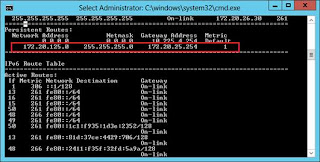
6. If you are using separate networks for Hyper-V Replica Traffic,
you will need to configure a persistent route to ensure Hyper-V Replica traffic
will route correctly. Use route add –p
command on all Hyper-V hosts.
7. Configure your Hosts file to include the FQDN and NetBIOS names
of each Hyper-V host that needs to be replicated “to and from”. It was
discovered the Hyper-V Replica Broker will still use DNS to resolve the names
of each Hyper-V host and as a result will still resolve the Parent Network IP
Address. The only option is to update the C:\windows\system32\drivers\etc\hosts
file to include the replica network IP address on EVERY SINGLE HYPER-V Host.
8. You can now configure Hyper-V Replica on your Virtual Machines.
Check Task Manager Network performance to ensure that the Initial Replication
is copying across the dedicated Hyper-V Replica Network.
That’s it! This will need to configured identically on the
corresponding Replica Site.